
How To: Check if a Specified Port is in Use
A port conflict error typically occurs when another application is already using the port required by Titan Server. Identifying and resolving the port conflict ensures the Titan Server can start properly.
Steps
First, we need to identify who’s using the port, to so this –- Open Windows Command Prompt by pressing windows key + R and type cmd.
- Then enter the command 'nestat –ano | findstr' : <port> to see if port is listening.

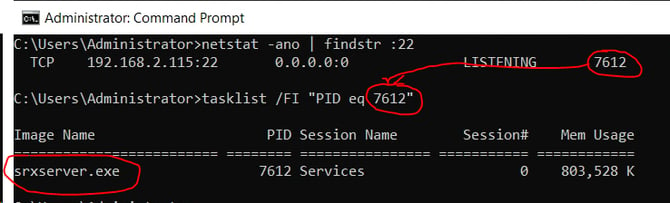
Note: In this example, only srxserver.exe is using port 22. However, in some cases, Titan SFTP may not function properly on port 22 if another application is already using it. Understanding this can help prevent conflicts and reduce the time spent troubleshooting the issue.