Skip to content
  • There are no suggestions because the search field is empty.

How To: Get the list of Variables

How To: Get the list of Variables

Question

Where can I get the list of Variables Titan uses? 

Answer

Below are the steps to get the list of Variables:

Steps

  1. Go to Domain > Server
  2. Click Connections.
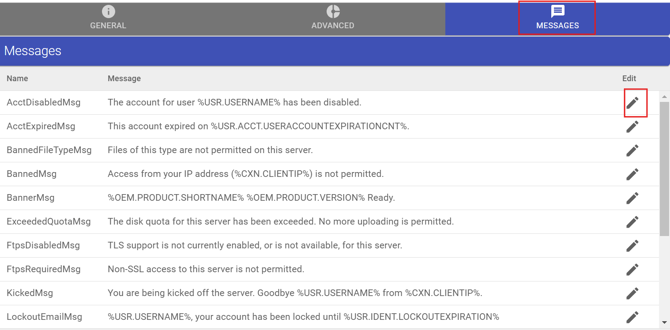
  3. Go to ‘Messages’ Tab
  4. Under Edit, click the Pencil Icon.
 

A screenshot of a computerDescription automatically generated


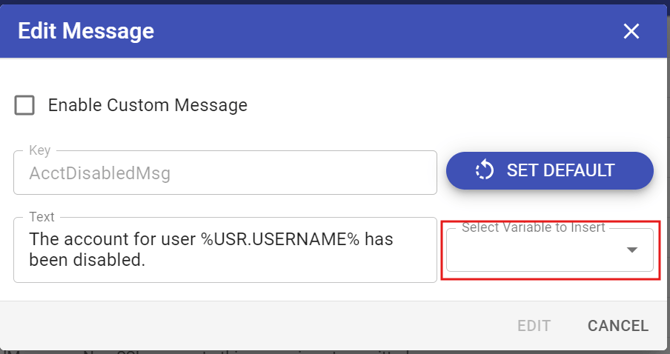
  1. In the Edit Message, choose the Select Variable to Insert to list all the available variables.

A screenshot of a computerDescription automatically generated

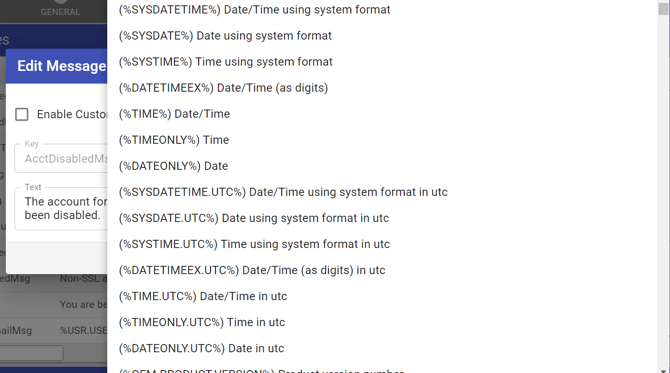
  1. You should see now all the variables available and their definitions.

A screenshot of a computer programDescription automatically generated


Need More Help? We’ve Got You Covered.

If you didn’t find what you were looking for, our support team is here to help. Customers with active maintenance and support can join the help desk and Submit a ticket and one of our experts will follow up shortly.